
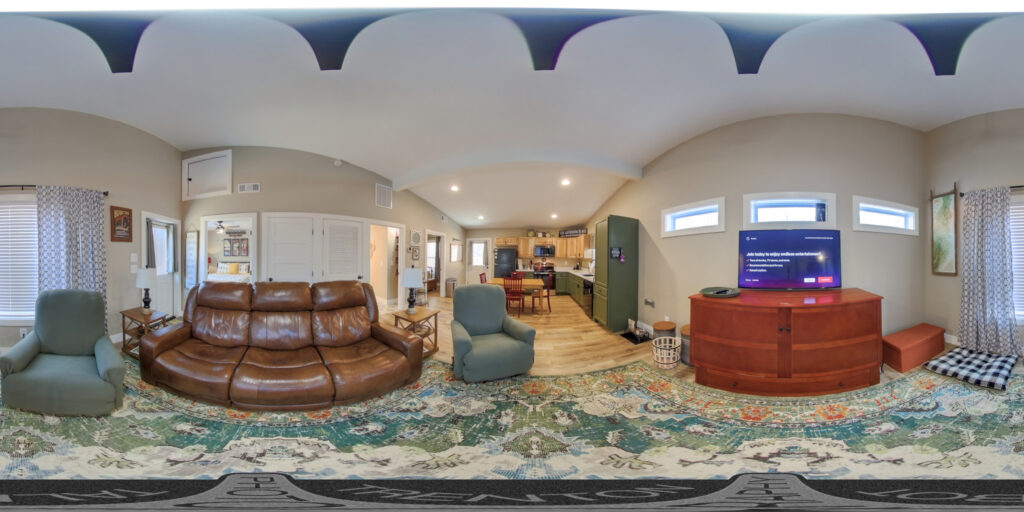
What you see above is a quick virtual tour demo to illustrate what can be done with 360 photography on a typical WordPress website.
Make sure to hit the “Full Screen” button at the bottom right corner of VR viewer, and interact with points of interest as you navigate the tour. In this case, I kept it simple – you click an icon, and it moves the POV to its specific location. And of course you can pan, zoom in/out, etc – just like on Google Street View.
It is possible to change the icons to suit your needs, add informative (or entertaining) tooltips, popups, sales pitches etc. When you’re self hosting, sky’s the limit. You can even use emojis if your target audience likes to 🗣️ in 🧩.
Any “proper” virtual tour platform, including self hosted options, should be able to accommodate embedding photos, videos, audio, automatic panning when idle, etc.
Besides self hosting, you have quite a few other options:
- A lot of real estate SaaS platforms specializing in VR tours will host one tour for free. Additional tours, of course, will incur a monthly fee, but many Airbnb hosts only need one.
- If your property is not Airbnb – Zillow has a well developed VR tour hosting platform.
- For properties that have their own Google Business pages, you can upload individual 360 photos and Google will render them automatically using Street View engine. Not exactly a proper virtual tour, but it’s free.
- Facebook also renders 360 images automatically.
- Some 3rd party options, including Google, allow for embedding VR tours and 360 photo viewers into your existing website via simple HTML insertion, so it can be done on almost any website.
Ready to elevate your online presence with stunning VR tours? Let’s capture breathtaking panoramic photos and seamlessly integrate them into your website or preferred platform. Contact me now to get started!